
ChaosSQL

Your tests pass. Your balances don't add up.

ChaosSQL forces the races between transactions in PostgreSQL, MySQL and SQLite, then hands you the smallest test that reproduces the bug.

banking_lost_updateseed 42 · READ_UNCOMMITTED
  1. T1: BEGIN
  2. T2: BEGIN
  3. T1: SELECT balance FROM accounts WHERE id = 1;
  4. T2: SELECT balance FROM accounts WHERE id = 1;
  5. T1: UPDATE accounts SET balance = 981 WHERE id = 1;
  6. T1: INSERT INTO ledger (account_id, amount, type) VALUES (1, 19, 'DEBIT');
  7. T1: COMMIT
  8. T2: UPDATE accounts SET balance = 989 WHERE id = 1;
  9. T2: INSERT INTO ledger (account_id, amount, type) VALUES (1, 11, 'DEBIT');
  10. T2: COMMIT
Stored balance
$989
Expected
$970
Invariant
fails: $989 ≠ $970
  • Works with PostgreSQL, MySQL and SQLite
  • Open source, MIT licensed
  • One static Go binary, no CGO
  • GitHub

A lost update in four steps

This is a real run of the banking example, recorded with seed 42. Nothing on this page is mocked.

  1. Two withdrawals read the same balance

    Both transactions read $1,000 before either one writes. Each is correct on its own.

  2. Each one writes its own result

    The first debits $19 and saves $981. The second debits $11 and saves $989.

  3. The second write erases the first

    The account ends at $989 instead of $970. A $19 debit vanished and no error reaches the logs.

  4. ChaosSQL proves it and hands you the test

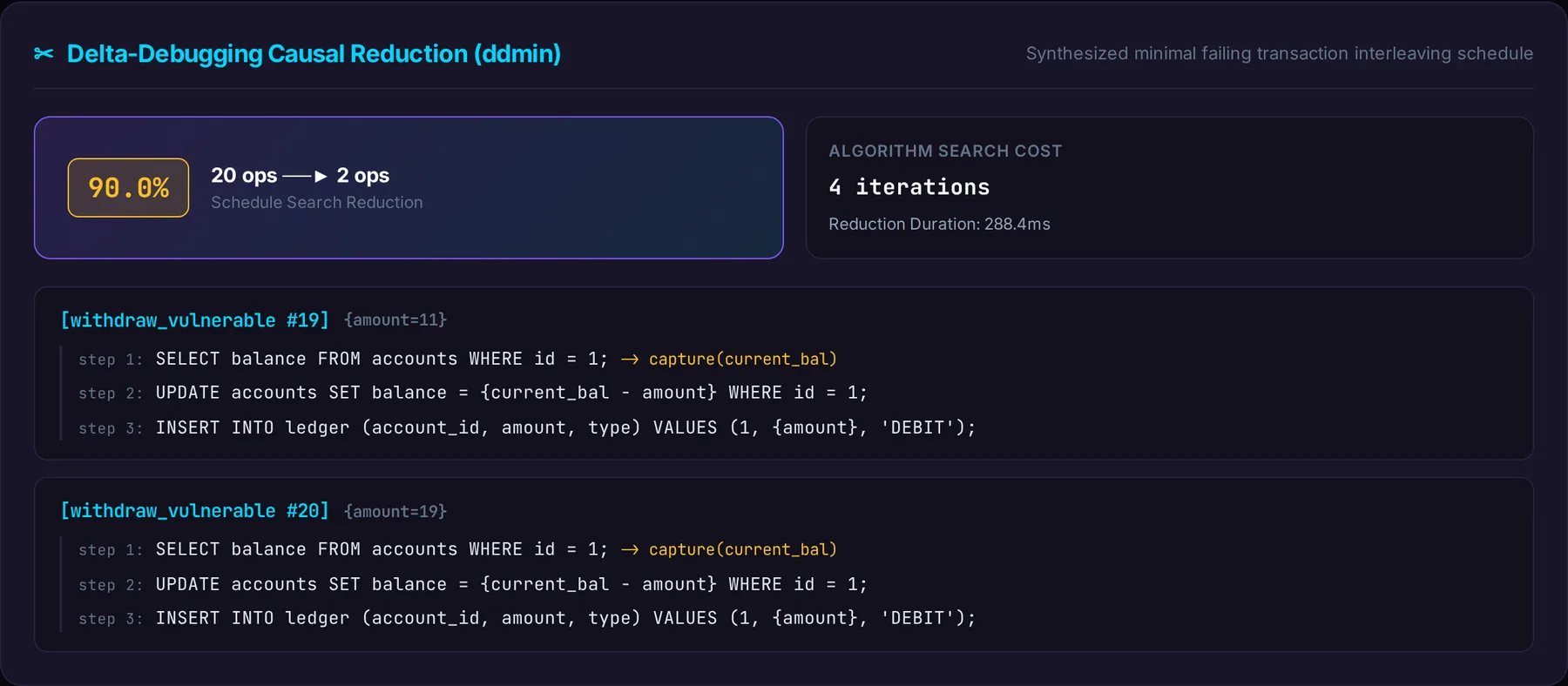
    The invariant fails, the engine replays the exact order, and delta debugging keeps only the 2 transactions that cause it, in repro_test.go.

banking_lost_updateseed 42 · READ_UNCOMMITTED
  1. T1: BEGIN
  2. T2: BEGIN
  3. T1: SELECT balance FROM accounts WHERE id = 1;
  4. T2: SELECT balance FROM accounts WHERE id = 1;
Stored balance
$1,000
Expected
$970
Invariant
checked when both commit

repro_test.go20 to 2 transactions

Words used here

Invariant
A rule your data must always obey, written as a SQL query. For example: the balance equals the opening balance minus every debit.
Isolation level
How much one transaction can see of another that is still running. Weaker levels are faster and allow more of these bugs.
Seed
A number that fixes the order of every operation, so the same seed replays the same run.
It happens in more than banking

Each example ships with its schema, its invariant and a recorded failing run.

Lost update

Two withdrawals at once and one of them disappears from the balance.

The rule that breaks

The balance always equals the opening balance minus every recorded debit.

Open in the playground
Minimal failing trace
T1  BEGIN
T2  BEGIN
T1  SELECT balance FROM accounts WHERE id = 1;
T2  SELECT balance FROM accounts WHERE id = 1;
T1  UPDATE accounts SET balance = 981 WHERE id = 1;
T1  INSERT INTO ledger (account_id, amount, type) VALUES (1, 19, 'DEBIT');
T1  COMMIT
T2  UPDATE accounts SET balance = 989 WHERE id = 1;
T2  INSERT INTO ledger (account_id, amount, type) VALUES (1, 11, 'DEBIT');
T2  COMMIT
Recorded with seed 42 from examples/banking_lost_update/chaos.yaml

See all scenarios

From 20 transactions to the 2 that matter

A failing run is noisy. Delta debugging removes transactions until nothing more can be removed without the bug going away, and checks that result against the database.

Each square is one transaction of the failing run. Delta debugging keeps the 2 highlighted ones and proves nothing else is needed.

smaller
90%
replays to prove it
7
to shrink and verify
< 1 s

Numbers from the recorded banking run. Our evaluation suite requires at least 85% reduction on every failing trace. How we measure

The same run in the HTML report, exported with --export-html.

Run it on every pull request

The GitHub Action runs your scenarios, writes a JUnit report and a job summary, and attaches the reproduction.

A violation fails the job: make it a required check and the bug cannot merge. With ChaosSQL Cloud you can fail only on regressions: it compares each pull request against main and comments the minimal trace.

.github/workflows/concurrency.yml
name: Concurrency Guard
on:
  pull_request:
    branches: [main]

permissions:
  contents: read
  pull-requests: write

jobs:
  concurrency:
    runs-on: ubuntu-latest
    steps:
      - uses: actions/checkout@v4
      - uses: bregaldahq/chaossql@v1.6.0
        with:
          spec-path: chaos/transfers.yaml
          seed: '42'
          export-junit: chaossql-junit.xml
          export-repro: 'true'
          # Optional, ChaosSQL Cloud: baseline against main and PR comments
          cloud-token: ${{ secrets.CHAOSSQL_CLOUD_TOKEN }}

Start free. Pay when it protects production.

Open source

Free

The full engine, every exporter and the GitHub Action. MIT licensed.

Cloud

From $39 per month

History, baselines against main, pull request comments and alerts. In early access.

Join the Cloud waitlist

Concurrency audit

$1,490, one week

We map your five most critical transactions, explore more than 100,000 schedules and deliver the failing tests with fixes.

Book an audit

Compare plans

Questions engineers ask first

Does it run against my production database?

No, and it must not. Every run resets the schema and seed data, so point it at a disposable database: a CI service container or a local copy.

Which databases does it support?

PostgreSQL, MySQL and SQLite, plus an in-memory driver for the browser playground. SQLite serializes writes at its default level, so most anomalies show up on PostgreSQL, MySQL or weaker isolation levels.

How is this different from a load test?

A load test measures throughput and hopes a race happens. ChaosSQL chooses the interleaving from a seed, checks a business rule after every run and replays the exact order that broke it.

Is it really deterministic?

The same spec and seed always produce the same schedule. Databases still decide some timing on their own, and ChaosSQL reports that difference instead of hiding it.

Will a violation fail my build?

Yes. chaossql run exits 1 on a violation, after writing the JUnit report and job summary, and the GitHub Action fails its step. Use fail-on: regression with ChaosSQL Cloud to fail only on new problems, or fail-on: never to only report.

What do I need to install?

Only the binary: go install gives you a single static Go program with no CGO. The Python and TypeScript SDKs call the same binary.

What does the audit include?

A 45 minute kickoff, the five most critical transactions mapped, more than 100,000 schedules explored, Go reproduction tests, a final report presented to your team and three months of Cloud Team.

Find the race before your customers do.

Install the CLI in one command, or book an audit before your next launch.

shell
go install github.com/bregaldahq/chaossql/cmd/chaossql@latest

Join the Cloud waitlist

We will write when your invite is ready. No spam, no card.